
If you build SaaS for long enough, somebody will ask for custom domains. Their your.customdomain.com should hit your platform and serve their content, and they want it to feel like their own. The hard part is not the routing. The hard part is TLS.
You cannot pre-issue certificates for hostnames you do not know about yet, and you cannot ask users to upload their own certs. The answer is on-demand TLS, where your edge proxy issues a Let's Encrypt cert the first time a hostname is requested, on the condition that you authorize it.
Cloudflare for SaaS solves this commercially. It also has per-hostname pricing that adds up fast once you cross the free tier. For Reslug, I run Caddy on a small Hetzner VPS instead. It costs me a few euros a month and handles every Pro customer's custom domain.
This is the full setup: the Caddyfile, the ask endpoint that authorizes hostnames, and the ASP.NET Core middleware that resolves the incoming Host header to a workspace. Code is .NET 9, EF Core with PostgreSQL.
The architecture
Three components, in this order:

Follow the top row of the diagram, left to right: that is the request path. The customer's browser opens https://your.customdomain.com, which resolves via DNS to proxy.reslug.link (the customer's CNAME target). The request lands on Caddy, running on a Hetzner VPS. Caddy sees a TLS connection for a hostname it does not yet have a certificate for, calls the API to ask whether this hostname is registered, gets a 200, issues the cert via Let's Encrypt, caches it, and forwards the now-decrypted HTTPS request to the ASP.NET Core Web API (the cube on the right).
The bottom row is the response path, right to left. The API runs the request through its middleware (where the Host header is resolved to a workspace) and into the matching controller, which produces a response. That response goes back through Caddy, the same TLS terminator that handled the request, and out to the customer's browser. Caddy is on both rows because it sits on the request and response path; it is the only thing that ever holds the TLS session for the custom domain.
Two consequences worth being explicit about. First, the API never serves TLS directly for custom domains: Caddy does, which is why the cert-issuance and renewal logic lives entirely in the proxy layer. Second, the API's job shrinks to two things: tell Caddy which hostnames are valid (the ask endpoint), and resolve the Host header on incoming requests to find the right workspace (the middleware). Subsequent requests for the same hostname skip the ask call until the cert renews, so the ask endpoint is cold-path, not hot-path.
Why Caddy on-demand TLS
Three reasons it wins for this use case.
First, on-demand TLS is a first-class Caddy feature, not a plugin. You toggle it in the Caddyfile and Caddy handles ACME, storage, renewal, and rate-limit backoff.
Second, the ask directive is the right abstraction. Caddy will not issue a cert for a hostname unless your backend says yes. That single hook prevents abuse (someone pointing a million domains at your proxy) and keeps authorization where your business logic lives.
Third, the cost. A Hetzner CX22 runs about 5 EUR a month and will comfortably handle thousands of custom domains. You only pay more when you want HA, which you can postpone until it actually matters.
Step 1: The Caddyfile
Here is the full Caddyfile running on proxy.reslug.link:
{
    email ops@reslug.com

    on_demand_tls {
        ask https://api.reslug.com/api/internal/caddy/ask?secret={env.CADDY_ASK_SECRET}
        interval 2m
        burst 5
    }
}

# Catch-all for any custom domain pointed at this proxy
:443 {
    tls {
        on_demand
    }

    reverse_proxy https://api.reslug.com {
        header_up Host {http.request.host}
        header_up X-Forwarded-Host {http.request.host}
        header_up X-Forwarded-Proto {http.request.scheme}
        header_up X-Forwarded-For {http.request.remote.host}
    }
}

# Health endpoint for the VPS itself
proxy.reslug.link {
    respond /healthz "ok" 200
}
A few things to call out.
The global on_demand_tls block holds the ask URL and the issuance rate limits.interval 2m and burst 5 gate certificate issuance attempts, not ask calls: Caddy will allow at most 5 new cert obtains in any 2 minute window across the whole server. Why that matters: Let's Encrypt has its own per-account and per-hostname rate limits, and exhausting them can lock you out for hours. The burst/interval knobs are your local circuit breaker so a flood of random unknown hostnames (which Caddy would otherwise try to issue certs for, one per handshake) cannot run you into Let's Encrypt's ceiling.
The ask endpoint itself is hit on every fresh handshake for a hostname Caddy has no cert for: that is what authorizes the obtain in the first place. Most rejections (NotFound) never make it as far as the issuance step, so the rate limits mostly protect you against the small fraction that pass the ask check. If your ask endpoint is on a separate, cheap path (it should be), the per-request load is not the concern; the Let's Encrypt account limit is.
The shared secret goes in the query string. I will come back to this, because it is the gotcha that bit me.
The :443 site is a catch-all. Any TLS request that does not match a more specific site falls through here, and tls { on_demand } tells Caddy to issue a cert on first sight (subject to the ask check).
The reverse_proxy block preserves the original Host header. This is critical. The backend needs to see your.customdomain.com, not api.reslug.com, because that is how it identifies the workspace.
Worth noting: in Caddy v2, reverse_proxy already preserves the upstream-bound Host header and sets X-Forwarded-Host, X-Forwarded-Proto, and X-Forwarded-For automatically. The header_up lines above are making those defaults explicit, which is useful for readers who want to see exactly what is going upstream, but you can delete all four of them and the behavior is identical. Keep them if you ever plan to override one; drop them if you prefer a leaner Caddyfile.
Set CADDY_ASK_SECRET as a systemd unit env var or in /etc/caddy/Caddyfile.env. Do not commit it.
Step 2: The ask endpoint
When Caddy gets a TLS request for an unknown hostname, it hits this endpoint with a GET and a domain query parameter. A 200 response means "issue the cert." Anything else means "do not."
Here is the controller:
namespace Reslug.API.Controllers.Internal;

[ApiController]
[Route("api/internal/caddy")]
[AllowAnonymous]
public sealed class CaddyAskController(
    ReslugDbContext db,
    IOptions<CaddyOptions> options,
    ILogger<CaddyAskController> logger) : ControllerBase
{
    private readonly CaddyOptions _options = options.Value;

    [HttpGet("ask")]
    public async Task<IActionResult> Ask(
        [FromQuery(Name = "domain")] string? domain,
        [FromQuery(Name = "secret")] string? secretQuery,
        CancellationToken ct)
    {
        // Accept the secret from either the header OR the query string.
        // Caddy's ask directive sends it in the URL; some setups
        // proxy through an extra hop and add it as a header.
        var providedSecret = Request.Headers["X-Caddy-Secret"].FirstOrDefault()
                             ?? secretQuery
                             ?? string.Empty;

        // Hash both sides before comparing so FixedTimeEquals always sees
        // equal-length spans. Comparing raw byte arrays of different lengths
        // throws CryptographicException, which would 500 instead of 401.
        var providedHash = SHA256.HashData(Encoding.UTF8.GetBytes(providedSecret));
        var expectedHash = SHA256.HashData(Encoding.UTF8.GetBytes(_options.AskSecret));

        if (!CryptographicOperations.FixedTimeEquals(providedHash, expectedHash))
        {
            logger.LogWarning("Caddy ask called with invalid secret");
            return Unauthorized();
        }

        if (string.IsNullOrWhiteSpace(domain))
        {
            return BadRequest();
        }

        var hostname = domain.Trim().ToLowerInvariant();

        // Reject our own primary domains. Caddy should never be issuing
        // certs for these.
        if (_options.ReservedHostnames.Contains(hostname))
        {
            return NotFound();
        }

        var exists = await db.Domains.AnyAsync(
            d => d.Hostname == hostname
                 && d.IsVerified
                 && d.IsActive,
            ct);

        if (!exists)
        {
            logger.LogInformation("Caddy ask rejected for unregistered domain {Hostname}", hostname);
            return NotFound();
        }

        return Ok();
    }
}

public sealed class CaddyOptions
{
    public const string SectionName = "Caddy";

    [Required, MinLength(32)]
    public required string AskSecret { get; init; }

    public required HashSet<string> ReservedHostnames { get; init; } =
        new(StringComparer.OrdinalIgnoreCase);
}
Three things matter here.
The secret check hashes first, then uses FixedTimeEquals.The comparison is done in constant time so an attacker cannot use response timing to guess the secret one byte at a time. The reason for SHA-256 hashing both sides first is a real footgun: CryptographicOperations.FixedTimeEquals throws CryptographicException if the two byte arrays differ in length, which would turn a missing or short secret into a 500 instead of a 401. Hashing makes both inputs exactly 32 bytes regardless of the secret length, so the comparison is always safe.
Verified and active.A domain row exists from the moment a user adds it in the UI, but it only passes the ask check after DNS verification completes and the user has not disabled it. If you skip the IsVerified filter, anyone can point a hostname at your proxy and force a cert issuance.
Lowercase everything. Hostnames are case-insensitive per RFC 1035, but your database is not. Normalize on both write and read.
The gotcha: header vs query param
I originally had the controller only accept X-Caddy-Secret as a header. Caddy's ask directive sends a plain GET, and the only practical way to attach a secret is in the URL. So every ask call was returning 401, Caddy stopped issuing certs, and customers started seeing browser warnings.
The fix is what you see above: read from the header first, fall back to the query param. It costs nothing and means you can switch transport later if you add a sidecar that injects headers.
If you only want one path, pick the query param. Caddy supports it natively, and the secret never appears in HTTP request logs unless you explicitly log query strings (most defaults do not).
Step 3: Host resolution middleware
The backend now needs to know which workspace a request belongs to when the Host header is something like your.customdomain.com. This runs very early in the pipeline, before authentication, because public link redirects need it and they are anonymous.
namespace Reslug.API.Middleware;

public sealed class CustomDomainMiddleware(RequestDelegate next)
{
    private static readonly TimeSpan CacheDuration = TimeSpan.FromMinutes(5);
    private const string CacheKeyPrefix = "domain:";

    public async Task InvokeAsync(
        HttpContext context,
        ReslugDbContext db,
        IMemoryCache cache,
        IOptions<ReslugOptions> options)
    {
        var host = context.Request.Host.Host?.ToLowerInvariant();

        if (string.IsNullOrEmpty(host) || IsPrimaryDomain(host, options.Value))
        {
            await next(context);
            return;
        }

        var cacheKey = CacheKeyPrefix + host;

        var resolution = await cache.GetOrCreateAsync(cacheKey, async entry =>
        {
            entry.AbsoluteExpirationRelativeToNow = CacheDuration;

            return await db.Domains
                .AsNoTracking()
                .Where(d => d.Hostname == host && d.IsVerified && d.IsActive)
                .Select(d => new CustomDomainResolution(d.Id, d.WorkspaceId))
                .FirstOrDefaultAsync();
        });

        if (resolution is not null)
        {
            context.Items["DomainId"] = resolution.DomainId;
            context.Items["WorkspaceId"] = resolution.WorkspaceId;
            context.Items["IsCustomDomain"] = true;
        }

        await next(context);
    }

    private static bool IsPrimaryDomain(string host, ReslugOptions options) =>
        options.PrimaryHostnames.Contains(host);
}

public sealed record CustomDomainResolution(Guid DomainId, Guid WorkspaceId);
A few notes.
AsNoTracking() matters.This middleware runs on every request that does not match a primary domain. You do not want the change tracker holding references.
Cache aggressively.The result is essentially read-only from a request's perspective. A 5 minute cache means a hot custom domain costs one DB hit every 5 minutes per backend instance instead of one per request. If a customer disables their domain, they will see it propagate within 5 minutes, which is fine.
Negative caching is optional but worth considering.As written, an unregistered hostname will hit the database every request. In practice the ask endpoint should already prevent Caddy from forwarding traffic for hostnames you do not know about, so this is rarely a problem. If you expose the same backend to direct traffic (skipping Caddy), add a cache.Set(cacheKey, null, ShortTtl) branch.
HttpContext.Items is the right place.Downstream code reads context.Items["WorkspaceId"] instead of hand-resolving from claims, which means controllers do not care whether the request came in over a custom domain or your primary domain. Wrap it in an IWorkspaceContext scoped service if you do this in more than a few places.
Step 4: Pipeline ordering
This trips people up. Here is the order that works:
var app = builder.Build();

// 1. ForwardedHeaders MUST be first.
// Caddy sets X-Forwarded-Proto and X-Forwarded-Host. Azure Container
// Apps' Envoy proxy adds its own layer. Without this, Request.Scheme
// is wrong and Request.Host is wrong, and the middleware below
// cannot do its job.
app.UseForwardedHeaders();

// 2. Custom domain resolution. Runs before auth because public
// redirects are anonymous and they need to know the workspace.
app.UseMiddleware<CustomDomainMiddleware>();

// 3. Swagger, CORS, etc.
app.UseSwagger();
app.UseCors();
app.UseHttpsRedirection();

// 4. Auth.
app.UseAuthentication();
app.UseAuthorization();

// 5. Anything that depends on auth claims.
app.UseMiddleware<WorkspaceContextMiddleware>();

app.MapControllers();
app.Run();
Configure ForwardedHeaders to actually trust what Caddy and Envoy send you:
builder.Services.Configure<ForwardedHeadersOptions>(options =>
{
    options.ForwardedHeaders = ForwardedHeaders.XForwardedHost
                             | ForwardedHeaders.XForwardedProto
                             | ForwardedHeaders.XForwardedFor;

    // Trust the forwarded headers from any proxy. This is only safe
    // when external ingress to this app is locked down (Container Apps
    // ingress IP allow-list, or a shared-secret header from Caddy that
    // this app validates separately). Without that, clients can hit the
    // Container Apps FQDN directly and spoof Host/Proto/For. See the
    // caveat below.
    options.KnownNetworks.Clear();
    options.KnownProxies.Clear();
});
If you are running directly on a VM with no Container Apps style ingress, lock KnownProxies to the IPs of your Caddy boxes. Trusting forwarded headers from untrusted sources is a real vulnerability (clients can spoof their apparent host and IP).
One important caveat about Container Apps.Clearing KnownNetworks and KnownProxies is only safe if direct ingress to your Container Apps FQDN (something like reslug-api.region.azurecontainerapps.io) is blocked. By default it is not: anyone who learns the FQDN can hit it directly, send X-Forwarded-Host: your.customdomain.com, and impersonate a registered custom domain end-to-end through the middleware below. The whole authorization model is only as strong as that ingress restriction.
Two practical ways to close this:
- Container Apps ingress restrictions. Add an IP allow-list (in the ingress configuration) that only permits the egress IPs of your Caddy VPS. This is the cleanest fix.
- A shared secret header from Caddy. Add
header_up X-Caddy-Origin {env.CADDY_ORIGIN_SECRET}in the Caddyfile and reject any request to the API that does not carry it. This works even when ingress IP filtering is not available, and survives Caddy egress-IP changes.
Without one of these in place, the on-demand TLS authorization above is only enforced for traffic that actually went through Caddy. Direct hits to the Container Apps FQDN sail past it.
What the user does
All of the above is invisible to the customer. From their seat, adding a custom domain is a short flow through the Reslug dashboard. Here is what it actually looks like end-to-end.
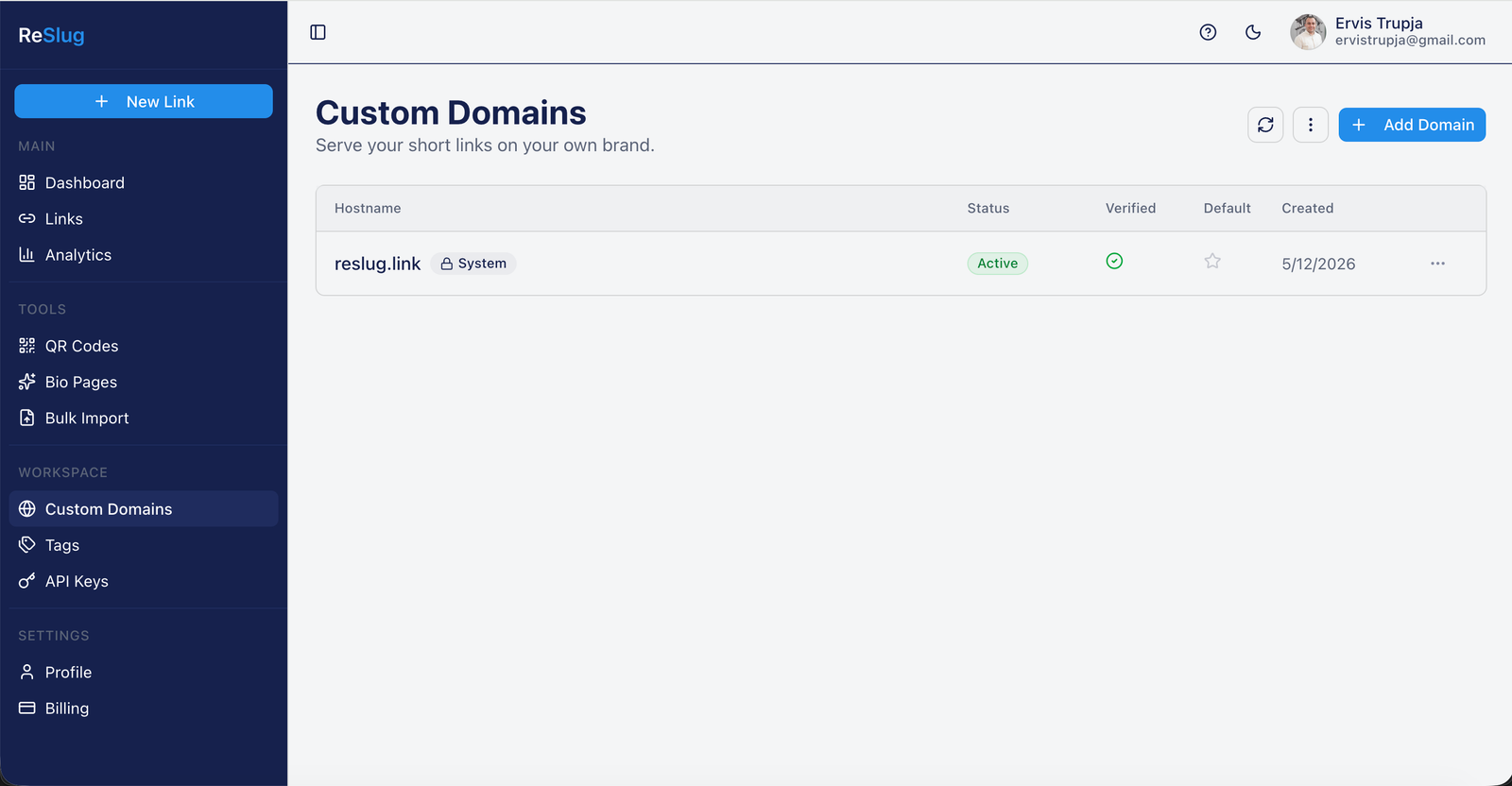
Step 1. They open Custom Domains in the workspace sidebar. The default workspace domain (reslug.link) is already there, marked as a System domain and active. They click Add Domain in the top right.
Step 2. A dialog asks for the hostname. They enter the subdomain they own (something like your.customdomain.com) and click Add Domain. The dialog explicitly calls out that apex domains are not supported yet, which matches what I noted earlier: CNAMEs do not work at the root of a domain.
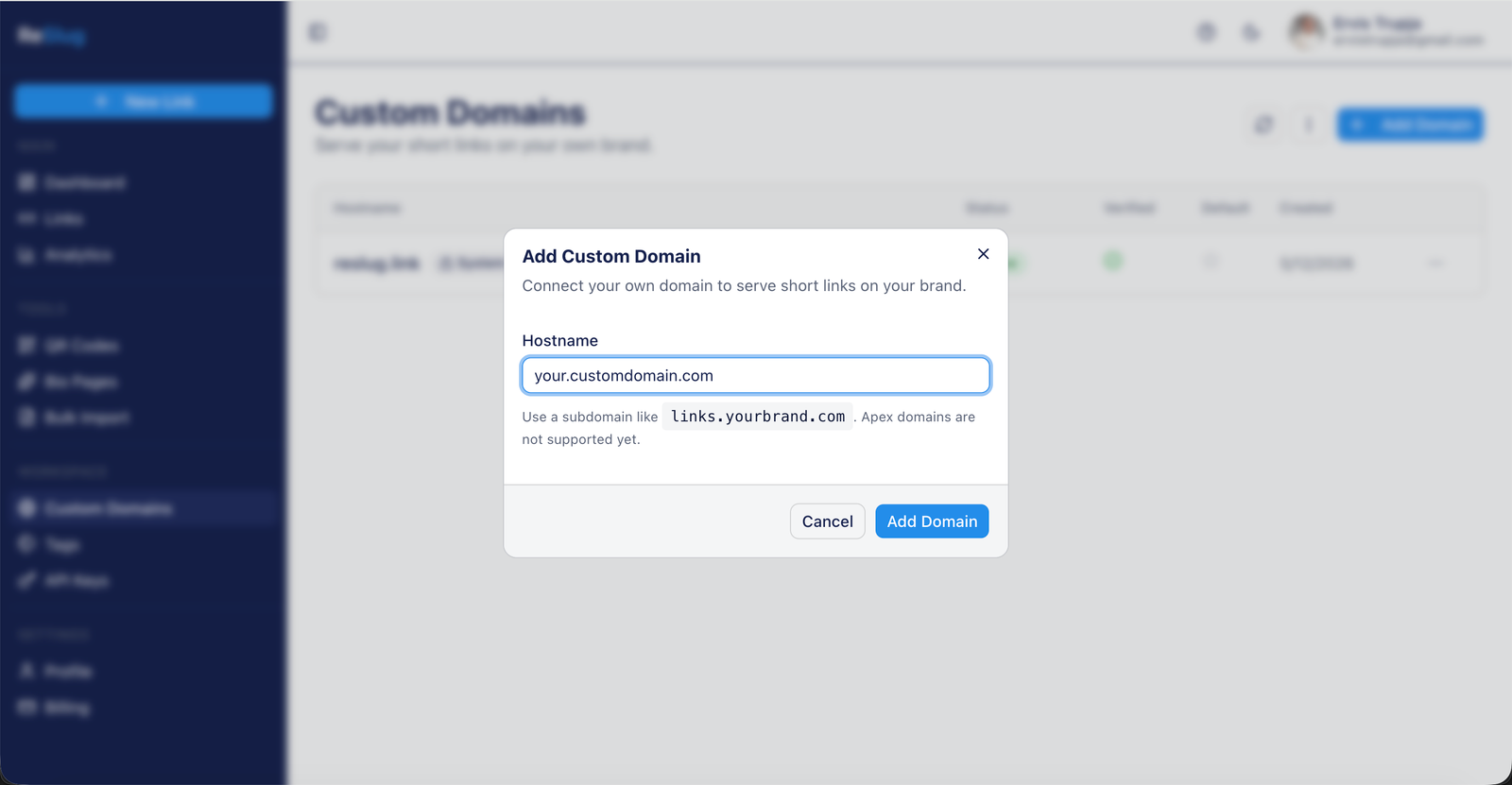
Behind the scenes, this is the moment a row gets inserted into the domains table with IsVerified = false and IsActive = true. Caddy's ask endpoint will still reject this hostname (because of the IsVerified filter) until the next step completes, so no cert can be issued for it yet, even if someone points DNS at the proxy.
Step 3. A side panel slides out with the exact DNS record to add at the customer's registrar. The CNAME points the customer's subdomain at proxy.reslug.link, which is the Hetzner box running Caddy. Once the record is live, they hit Verify now.
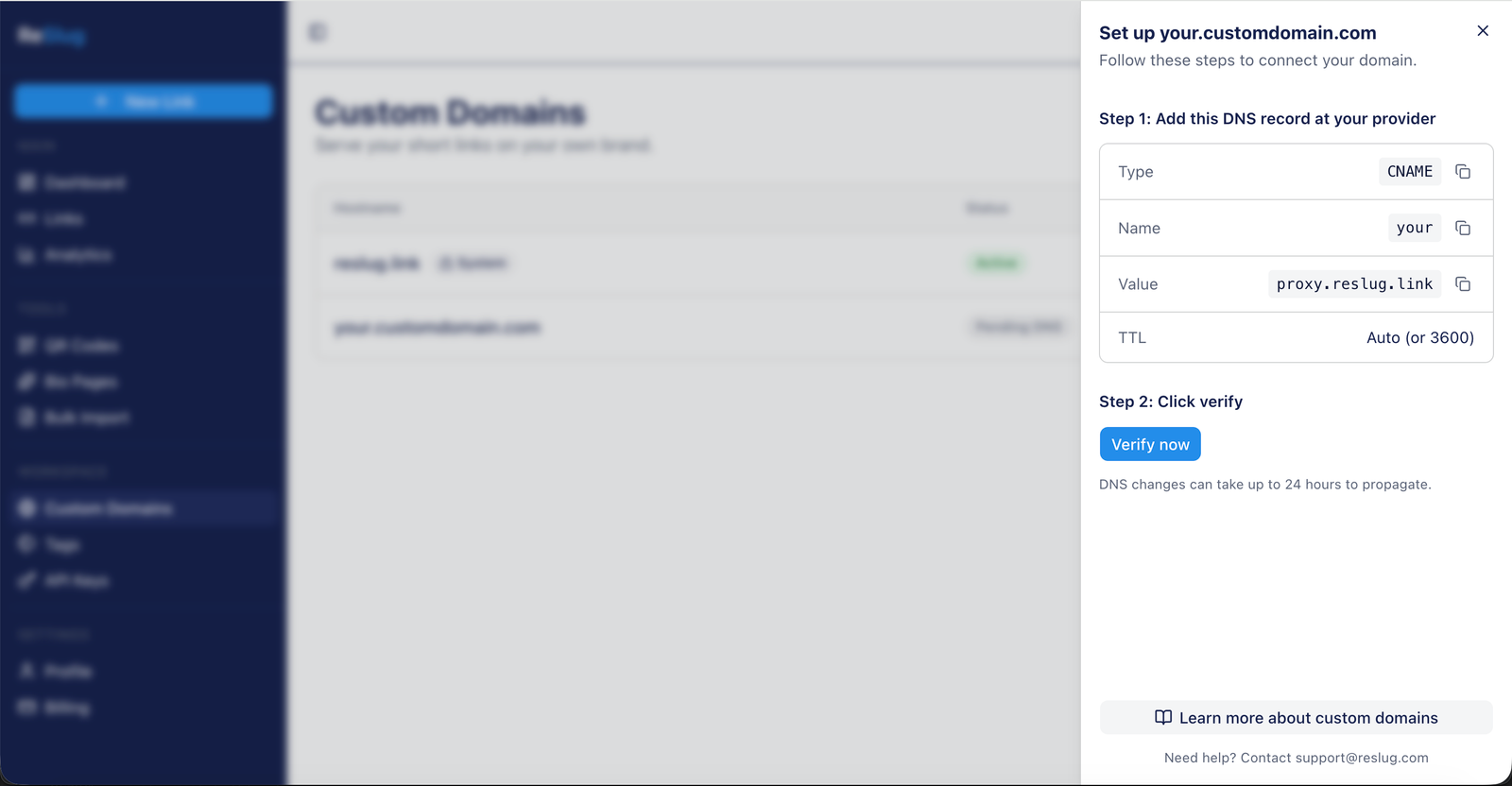
The Verify step does an actual DNS lookup from the API to confirm the CNAME resolves to proxy.reslug.link. Only when it does will IsVerified flip to true and the ask endpoint start saying yes for this hostname. I am skipping the implementation of that lookup here; it is its own post.
Step 4. Back on the list, the new domain shows up with status Pending DNS until verification completes. Once it passes, the row flips to Active and Verified, mirroring the system reslug.link row above it.
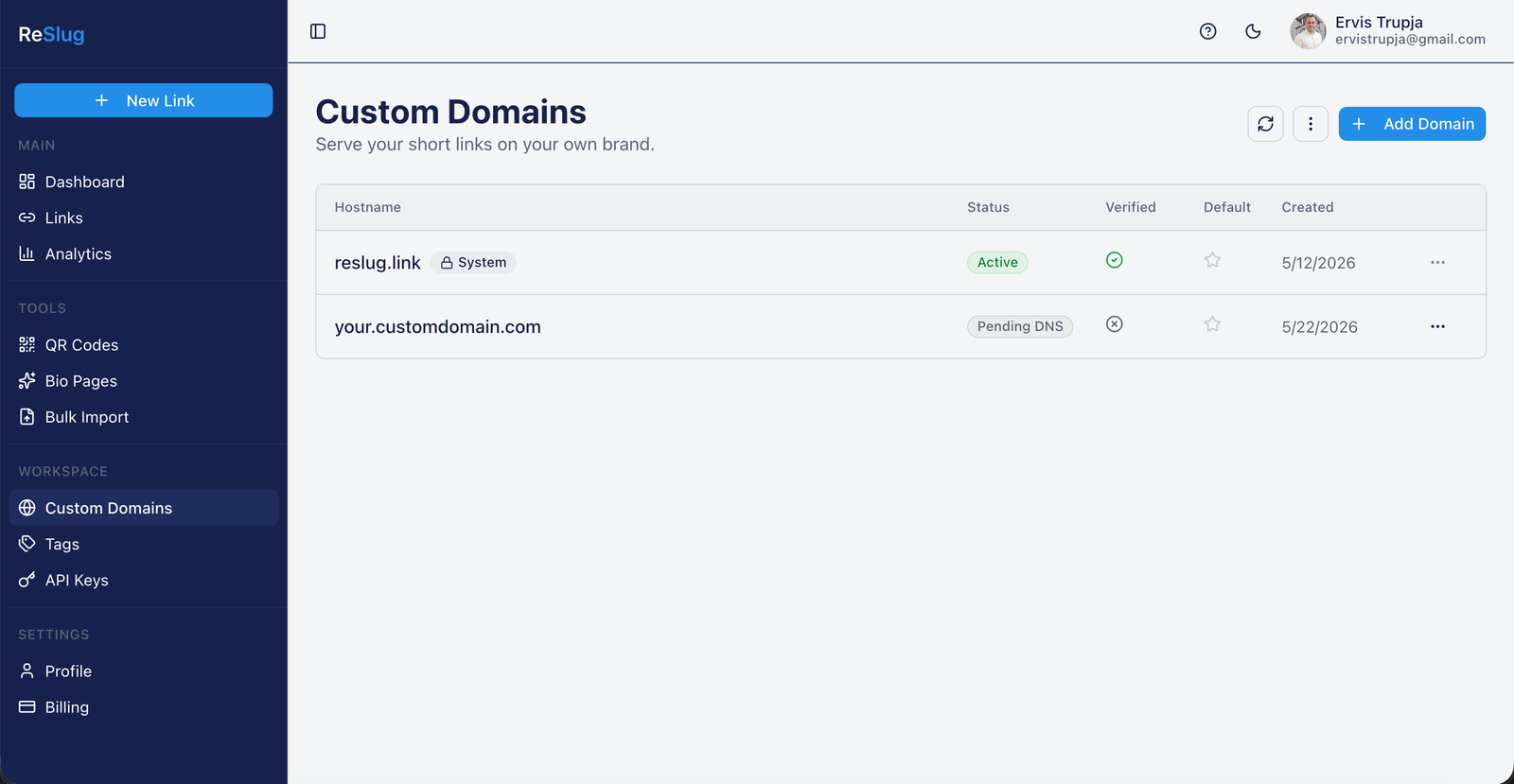
The next time anyone opens https://your.customdomain.com, Caddy asks the API, the API says yes, a cert is issued in a second or two via Let's Encrypt, and the request lands on the backend with Host: your.customdomain.com already resolved to a WorkspaceId in HttpContext.Items. From the customer's perspective, they added a row and copied a DNS record. Everything else is the system doing its job.
What is next
This is the core of the system: TLS termination, hostname authorization, and Host header resolution. The pieces I have left out and will cover separately:
- DNS verification. How you actually confirm the customer set the CNAME correctly before flipping
IsVerified = true, and how you re-verify periodically. - Apex domains. CNAMEs do not work at the root of a domain. You need an A record and a way to handle SNI for cases where Caddy is not the IP origin.
- HA and failover. A single Hetzner box is a single point of failure. Two boxes with shared cert storage (S3 backed, or a Caddy cluster) get you most of the way.
For now, the setup above is what runs in production for Reslug and serves every Pro customer's custom domain. Total infrastructure cost for the proxy layer: about 5 EUR a month.
If you build something similar, ping me. I'd love to compare notes.